A content audit is a structured review of every page and post on your website to decide what to keep, improve, merge or remove. It is one of the most cost-effective ways to improve your SEO and marketing, because it gets more value from content you have already paid for. Updating a page that already has some visibility is often quicker and more effective than writing something new.
Over time, most websites build up old blog posts, outdated service information, thin pages and articles that compete with each other in Google. A content audit clears that clutter, strengthens your best pages and shows you exactly where the gaps are. This guide explains why audits matter and how to run one step by step.
Why run a content audit?
- Better rankings. Refreshing and strengthening pages that are close to page one can lift them higher, and removing or merging weak pages helps Google focus on your best content.
- Fewer pages competing with each other. Several posts on the same topic can split your visibility. Merging them into one stronger page usually performs better. Our guide to keyword cannibalisation explains why.
- Accurate, trustworthy information. Outdated prices, services, staff or references to old events undermine trust with visitors.
- More enquiries. An audit is a chance to add clear calls to action and link helpful articles to relevant services.
- A smarter content plan. You will see which topics work, which are missing and where to focus future effort.
- Better chances in AI answers. Clear, current, well-structured pages are better placed to be used in Google’s AI Overviews and featured snippets.
How to run a content audit
1. Set your goals
Decide what you want the audit to achieve, such as more organic traffic, more enquiries from blog readers, a tidier site before a redesign or recovering from a drop in rankings. Your goals decide which data matters most.
2. List all your content
Create a spreadsheet of every URL on your site. A crawler such as Screaming Frog, your XML sitemap or your CMS can give you the list. Include the page title, content type, publish date and main topic.
3. Gather performance data
For each page, add data from:
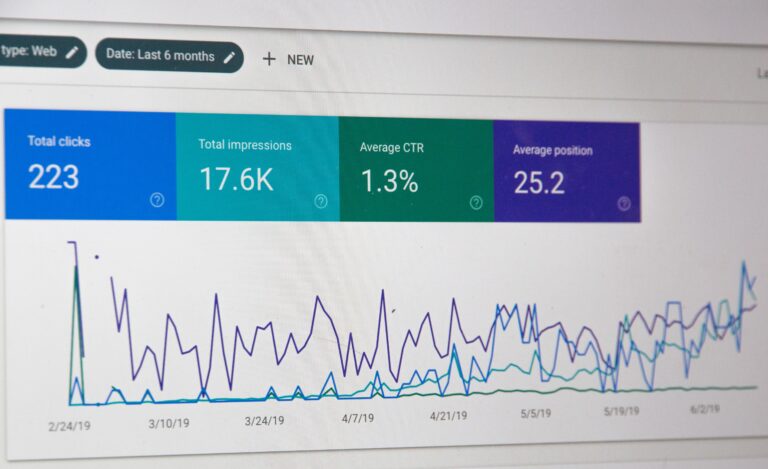
- Google Search Console: clicks, impressions, average position and the searches each page appears for.
- Google Analytics 4: views, engagement and key events such as enquiries or purchases.
- Backlink data: whether other websites link to the page, from Search Console or an SEO tool.
4. Assess quality
Data tells only part of the story. Read each page and ask: Is it accurate and current? Does it answer the question fully? Does it match what searchers want? Does it show real experience and expertise? Does it lead the reader to a next step?
5. Decide what to do with each page
Give every page one action:
- Keep: performing well and up to date. Leave it alone or make light tweaks.
- Update: a useful topic that is outdated, thin or slipping in rankings. Refresh facts, expand answers, improve headings and add internal links.
- Merge: several pages covering the same topic. Combine the best parts into one strong page and redirect the others to it with a 301 redirect.
- Remove: content with no traffic, no links and no value to visitors. Redirect it to the most relevant page if one exists.
6. Make the changes
Start with the pages likely to have the biggest impact, usually those with high impressions but low clicks, or pages ranking just off page one. When updating:
- Answer the main question early, then expand.
- Remove dated references, retired tools and old statistics you cannot verify.
- Improve page titles and meta descriptions to encourage clicks.
- Add internal links to related services and articles.
- Add a short FAQ section where it helps.
- Keep the existing URL wherever possible to preserve any authority it has built.
7. Find the gaps
Compare your content with the questions customers ask and the topics competitors cover. Note what is missing and add it to your content plan.
8. Measure and repeat
Track changes in Search Console and GA4 over the following months. Rankings can take time to settle after updates. Repeat the audit regularly, perhaps once a year for a small site, so your content stays fresh.
Common content audit mistakes
- Deleting pages without redirecting them, losing any links and traffic they had.
- Judging pages on traffic alone, when some low-traffic pages convert very well.
- Changing URLs unnecessarily.
- Updating the date without improving the content.
- Auditing once and never again.
FAQs
How often should I audit my content?
For most small business websites, once a year is a good rhythm, with lighter checks on key pages more often. Larger or fast-changing sites may need more frequent reviews.
Will deleting old blog posts hurt my SEO?
Removing genuinely poor, outdated content can help, but always check for traffic and backlinks first and redirect removed pages to a relevant alternative.
Is it better to update old content or write new posts?
Both have a place. Updating pages that already have some visibility is often the quicker win, while new content fills genuine gaps.
How long does a content audit take?
It depends on the size of your site. A small site might take a few days to review properly; a large one can take considerably longer.
Get more from your existing content
Pure Marketing is a Google Partner agency based in Birmingham’s Jewellery Quarter. Our SEO audits include a review of your content, showing what to keep, improve, merge or remove. Start with a free SEO audit or explore our SEO services.